There are a lot of S/W to convert from PPS to AVI/WMV but with the cost here are the list that I have tried. (How to Convert PowerPoint to Flash and Convert PowerPoint to flash and you can google convert PPS into Video)
1. Debut Video Capture (NO GOOD and costly)
Plan to capture the PPS when playing into Video to edit
2. BB Flash back express 2 (aka blueberry it is free)
It is good however it is also capture the bar for stop and start because the hotkeys to start and stop won't work
3. CamVideo (http://camstudio.org/ it is free)
Installed but not tested from web it seems good
4. NCH Suite
Trial version with watermark of their logo cannot use it
5. Presentation to Video Converter
Trial version with watermark of their logo cannot use it
6. PP2Flash
Trial version with watermark of their logo cannot use it. It is good, the plugin is set on the powerpoint program
6. On line converter. A lot of online converter shareslide.net or scribd.com, it is very confusing don't know which one is good
http://www.scribd.com/doc/3876331/How-to-Embed-Your-PowerPoint-Into-Blogger Need to submit into their server and using their embedded code insert into blog. Need to register
Finally I am do my way the best and it is free. Using VLC (www.videolan.org/vlc/) and I have been used it over a year for linux and windows. It is the best of shareware.
1. Open VLC 1.0.3 there are many tutorials in the web, I am using the lastest version
Open media->Streaming->Capture Device->Capture mode->Desktop->Desired Frame set 30-> click small icon next to stream->select play mode->convert->desination file->give it a name->profile->select->Video H.264+AAC->next small icon select edit profile->Encapsulate->MP4/MOV->select video code mode ->tick video->Bitrate->set=3600 kb/s->frame->set 30 or 35 frame/s->select width and heigh->w=640 and h=480 (dependend on video card)->Select Audio tab->Audio->Mp3 or Mp3->128kb/s->channel 2->sample rate 44100 or just Keep original audio or nothing you will add audio later I will show you next. There are 2 codec Audio va Video.
Don't select Start yet wait.
Open powerpoint select the presentation File ->open->file pps
then go back VLS hit start
then go back powerpoint to hit F5 play video slide full screen
When the powerpoint is finished you will have test.mp4 format as we select the file name is test.mp4
Now edit the movie, I am using Windows Movie Maker (old name) also called Live Movie Maker (new name) download at http://download.live.com/moviemaker
(there are many software claims free or shareware but it does not correct, it is free it means free download but when you install and using it, it requires you to pay or limit its feature or their put their logo into your video (watermark).
Live movie maker is just like Picasa3 of google but Microsoft movie maker has more feature when you need to edit the movie and it is faster too.
File open -> test.mp4
Slides open then click add video->split frame -> delete unwanted frame sometimes you have to use trim feature to trim within the frame by moving up and down arrow to get each pixels. If you are using Macromedia/Adobe Flash each frame including each cell equivalents to pixels. Windows maker does not show cells but you can select up and down for start point and end point in seconds. Because you capture desktop video there are some frames are capture between the time you hit start of VLC and F5 of powerpoint to make a nice video, these frames can be removed unless you are using like a tutorial. To see recorder button VLC->View->Advanced control ->tick it
the record button will show up. The default there is no record button.
VLC screen recording
VLC somehow does not record sound you need to capture screen then record audio using audacity then merge them using windows movie maker. This technique is used to make move windows media video player WMV then upload into blogger it will auto convert into FLV format. As you see in this blog entry http://thomasalvatran.blogspot.com/2010/01/bao-nhieu.html
Using this video I am using camstudio, you can record audio and on screen capture. It seems camstudio does everything for you it is good to make tutorial.
Wednesday, January 27, 2010

Friday, January 22, 2010
Basic protectection it is free: Microsoft Security Essentials, Spybot and ComboFix (Optional)
Enable restore point: it can be used to restore the date before the system is infected
Apply batch from microsoft: block the port 135 and so on for security and malware infected
Enable firewall: To prevent malware to come in to your system
Then install 2 anti-virus it is free:
- Download and Install Microsoft security essentials (Real time running)
http://www.microsoft.com/security_essentials/default.aspx
- Download and install Spybot (Real time running)
http://www.safer-networking.org/en/spybotsd/index.html
OPTIONAL WHEN INFECTED:
Usually each anti-virus is good for one think
- ComboxFix (need to scan some time for NT AUTHORIZE system is shutting down and others)
http://www.bleepingcomputer.com/combofix/how-to-use-combofix
- F-Secure Online Scan (should run in safe mode with internet connection for malware like Internet Security 2010 virus/malware)
http://www.f-secure.com/en_US/security/security-lab/tools-and-services/online-scanner/
-Malwarebytes' Anti-Malware
Download and run MalwareBytes AntiMalware to remove Internet Security 2010. Very good for Internet Security 2010 malware.
http://www.malwarebytes.org/mbam.php
Note: Norton Security 2010 for Win 7 is very good detected the website has Internet Security 2010 malware. It does not allow the infected size to write into the system it pops up the small windows to let you know. My XP was infected with this website
when searching for music, and click into
Unchained Melody Chords (ver 3) by Righteous Brothers @ Ultimate ...
Unchained Melody chords (ver 3) by Righteous Brothers at Ultimate-Guitar.Com, added on June 17, 2009.
http://www.ultimate-guitar.com/tabs/r/righteous_brother/unchained_melody_ver3_crd.htm
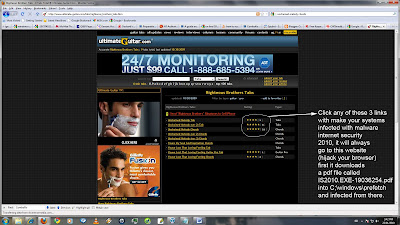
if your system does not have protected as soon as you visited this website,
Click any of these 3 links see picture with make your systems infected with malware internet security 2010, it will always go to this website (hijack your browser) first it downloads a pdf file called IS2010.EXE-19036254.pdf into C;\windows\prefetch
and infected from there. I am using F-security online and Malware-bytes to get rid of IS2010 Internet Security 2010 malware.
- Ad-Aware From Lavasoft
http://download.cnet.com/Ad-Aware-Free-Anti-Malware/3000-8022_4-10045910.html?part=dl-ad-aware&subj=dl&tag=top5
- Hijackthis to find out about malware to save log file for hijackthis log analyzer
http://download.cnet.com/Trend-Micro-HijackThis/3000-8022_4-10227353.html
- Spybot S&D for Malware such as CoolWebSearch
http://www.safer-networking.org/en/spybotsd/index.html
- Trojan remover
http://www.simplysup.com/tremover/download.html
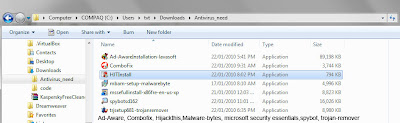
I have used Combofix, Spybot (Realtime scan), Ad-aware, Trojan remover (from http://www.simplysup.com) and hijackthis for 2 years proved to be good.
Now I added 2 more in the list:
Malware-byte and Microsoft security essential (Realtime scan).
msconfig
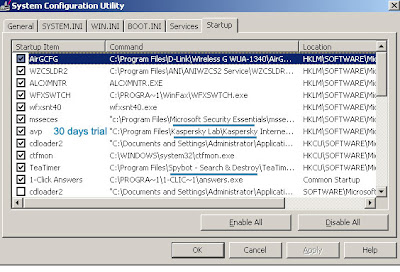
Service and Task
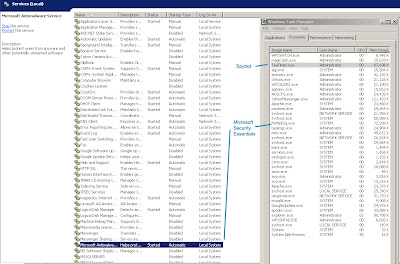
Things needed to have:
Apply batch from microsoft: block the port 135 and so on for security and malware infected
Enable firewall: To prevent malware to come in to your system
Then install 2 anti-virus it is free:
- Download and Install Microsoft security essentials (Real time running)
http://www.microsoft.com/security_essentials/default.aspx
- Download and install Spybot (Real time running)
http://www.safer-networking.org/en/spybotsd/index.html
OPTIONAL WHEN INFECTED:
Usually each anti-virus is good for one think
- ComboxFix (need to scan some time for NT AUTHORIZE system is shutting down and others)
http://www.bleepingcomputer.com/combofix/how-to-use-combofix
- F-Secure Online Scan (should run in safe mode with internet connection for malware like Internet Security 2010 virus/malware)
http://www.f-secure.com/en_US/security/security-lab/tools-and-services/online-scanner/
-Malwarebytes' Anti-Malware
Download and run MalwareBytes AntiMalware to remove Internet Security 2010. Very good for Internet Security 2010 malware.
http://www.malwarebytes.org/mbam.php
Note: Norton Security 2010 for Win 7 is very good detected the website has Internet Security 2010 malware. It does not allow the infected size to write into the system it pops up the small windows to let you know. My XP was infected with this website
when searching for music, and click into
Unchained Melody Chords (ver 3) by Righteous Brothers @ Ultimate ...
Unchained Melody chords (ver 3) by Righteous Brothers at Ultimate-Guitar.Com, added on June 17, 2009.
http://www.ultimate-guitar.com/tabs/r/righteous_brother/unchained_melody_ver3_crd.htm

if your system does not have protected as soon as you visited this website,
Click any of these 3 links see picture with make your systems infected with malware internet security 2010, it will always go to this website (hijack your browser) first it downloads a pdf file called IS2010.EXE-19036254.pdf into C;\windows\prefetch
and infected from there. I am using F-security online and Malware-bytes to get rid of IS2010 Internet Security 2010 malware.
- Ad-Aware From Lavasoft
http://download.cnet.com/Ad-Aware-Free-Anti-Malware/3000-8022_4-10045910.html?part=dl-ad-aware&subj=dl&tag=top5
- Hijackthis to find out about malware to save log file for hijackthis log analyzer
http://download.cnet.com/Trend-Micro-HijackThis/3000-8022_4-10227353.html
- Spybot S&D for Malware such as CoolWebSearch
http://www.safer-networking.org/en/spybotsd/index.html
- Trojan remover
http://www.simplysup.com/tremover/download.html
I have used Combofix, Spybot (Realtime scan), Ad-aware, Trojan remover (from http://www.simplysup.com) and hijackthis for 2 years proved to be good.
Now I added 2 more in the list:
Malware-byte and Microsoft security essential (Realtime scan).
msconfig

Service and Task

Things needed to have:

NT Authorize system shut down and "CoolWebsearch ctfmon32 parasite variant"
Description:
System shutdown problem - NT Authority\system - RPC service terminated.
NT Authority\System Error Message: "This system is shutting down. Windows must now restart because the Remote Procedure Call (RPC) service terminated unexpectedly."
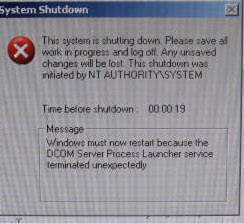
This system is shutting down. Please save all the work in ptogress nad log off...NT AUTHORITY SYSTEM
I have tried all of these anti-virus and none of them working:
1. Symantec W32.blaster.worm remove tool
http://www.symantec.com/security_response/writeup.jsp?docid=2003-081119-5051-99
2. W32.sasser.worm remove tool
http://www.symantec.com/security_response/writeup.jsp?docid=2004-050116-1831-99&tabid=3
3. McAfee Stinger Download v10.0.1.688
http://vil.nai.com/vil/stinger/
4. Microsoft Malicious Remove Windows-kb890830.v3.3.exe
http://www.microsoft.com/security/malwareremove/default.aspx
5. Microsoft Security Essentials
http://www.microsoft.com/security_essentials/default.aspx
(net stop MsMpSvc and net start MsMpSvc)
6. Kaspersky 30 dial trial
http://usa.kaspersky.com/trials/home-users/internet-security/registration-completed/
7. Prevx3.0
http://info.prevx.com/downloadcsi.asp
8. F-security on line scan
http://www.f-secure.com/en_US/security/security-lab/tools-and-services/online-scanner/
None of the above fixing NT Authorize system shut down
Then search on the net
http://www.spywareinfoforum.com/index.php?showtopic=125784
I used it over 2 years ago Combofix and Spypot from the internet it seems to resolve the problem and in my PC found Combofix but I forgot.
Using Combofix
http://www.bleepingcomputer.com/combofix/how-to-use-combofix
Fix the problem
For CoolWebsearch ctfmon32 parasite variant
1. Trend-Micro CWShredder
http://free.antivirus.com/cwshredder/
Not fixing the problem
2. Spypot S&D Search and Destroy
http://www.safer-networking.org/en/spybotsd/index.html
Spypot fixes the problem
Spypot found and destroy:
Sksdialer,CoolWWWsearch,ISeach.SideFind, Smitfraud-C, Locksky
Hijackhis and hijackthis log analyzer
1. DDS
It also have DDS.exe for log but hard to find website for log analyzer.
http://www.bleepingcomputer.com/forums/topic34773.html
2. Hijackthis
Hijackthis download from Trend-Micro
http://download.cnet.com/Trend-Micro-HijackThis/3000-8022_4-10227353.html
Run Hijackthis to get the log file then paste into website
http://hjt.networktechs.com/ (good) or http://www.2-spyware.com (confusing)
to get the name of the virus log from hijackthis. See below.
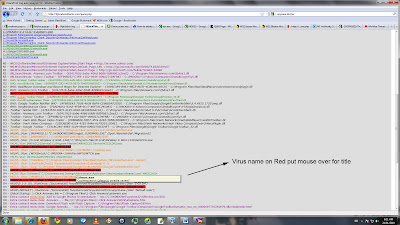
then go back to to hijackthis program click to fix the error. Hijackthis fix some degree. It cannot fix all CoolWebSearch. It requires more time to fix the main of hijackthis is to know the virus name. Then use the following tools to fix it.
Combofix, Spybot, Malware-bytes, F-security online...
NOTES:
Ad-Aware is good but Superantispyware is better, you shouldn't surf the net unprotected thats why you are getting so many infections.
To remove all infections you need to download, update and scan your computer with Malwarebytes and SuperantiSpyware then delete what ever they find.
Malwarebytes: http://www.malwarebytes.org/mbam.php
SuperantiSpyware: http://www.superantispyware.com/
Avast Anti-Virus: http://www.avast.com/eng/avast_4_home.html
To protect your PC in the future you need to use anti-virus software and a firewall, id recommend using Avast and Comodo Pro firewall both are very effective and completely free, you should also switch to Firefox 3 if you are browsing with IE as its much safer. (links on my profile)
Your computer is infected with rogue software. Download and run rogue antispyware removal tool from http://www.spywaregeeks.com to remove the rogue software from the computer.
Free anti-virus, Internet security, and PC maintenance software is all crap, purchase a highly rated Internet security suite, like Kaspersky Internet security, or Norton Internet security 2009 (2009 is redesigned and phenomenal performance on Vista)
It's pretty good, but not 100%. SpyBot is the "other" one folks use, usually together for better protection.
System shutdown problem - NT Authority\system - RPC service terminated.
NT Authority\System Error Message: "This system is shutting down. Windows must now restart because the Remote Procedure Call (RPC) service terminated unexpectedly."

This system is shutting down. Please save all the work in ptogress nad log off...NT AUTHORITY SYSTEM
I have tried all of these anti-virus and none of them working:
1. Symantec W32.blaster.worm remove tool
http://www.symantec.com/security_response/writeup.jsp?docid=2003-081119-5051-99
2. W32.sasser.worm remove tool
http://www.symantec.com/security_response/writeup.jsp?docid=2004-050116-1831-99&tabid=3
3. McAfee Stinger Download v10.0.1.688
http://vil.nai.com/vil/stinger/
4. Microsoft Malicious Remove Windows-kb890830.v3.3.exe
http://www.microsoft.com/security/malwareremove/default.aspx
5. Microsoft Security Essentials
http://www.microsoft.com/security_essentials/default.aspx
(net stop MsMpSvc and net start MsMpSvc)
6. Kaspersky 30 dial trial
http://usa.kaspersky.com/trials/home-users/internet-security/registration-completed/
7. Prevx3.0
http://info.prevx.com/downloadcsi.asp
8. F-security on line scan
http://www.f-secure.com/en_US/security/security-lab/tools-and-services/online-scanner/
None of the above fixing NT Authorize system shut down
Then search on the net
http://www.spywareinfoforum.com/index.php?showtopic=125784
I used it over 2 years ago Combofix and Spypot from the internet it seems to resolve the problem and in my PC found Combofix but I forgot.
Using Combofix
http://www.bleepingcomputer.com/combofix/how-to-use-combofix
Fix the problem
For CoolWebsearch ctfmon32 parasite variant
1. Trend-Micro CWShredder
http://free.antivirus.com/cwshredder/
Not fixing the problem
2. Spypot S&D Search and Destroy
http://www.safer-networking.org/en/spybotsd/index.html
Spypot fixes the problem
Spypot found and destroy:
Sksdialer,CoolWWWsearch,ISeach.SideFind, Smitfraud-C, Locksky
Hijackhis and hijackthis log analyzer
1. DDS
It also have DDS.exe for log but hard to find website for log analyzer.
http://www.bleepingcomputer.com/forums/topic34773.html
2. Hijackthis
Hijackthis download from Trend-Micro
http://download.cnet.com/Trend-Micro-HijackThis/3000-8022_4-10227353.html
Run Hijackthis to get the log file then paste into website
http://hjt.networktechs.com/ (good) or http://www.2-spyware.com (confusing)
to get the name of the virus log from hijackthis. See below.

then go back to to hijackthis program click to fix the error. Hijackthis fix some degree. It cannot fix all CoolWebSearch. It requires more time to fix the main of hijackthis is to know the virus name. Then use the following tools to fix it.
Combofix, Spybot, Malware-bytes, F-security online...
NOTES:
Ad-Aware is good but Superantispyware is better, you shouldn't surf the net unprotected thats why you are getting so many infections.
To remove all infections you need to download, update and scan your computer with Malwarebytes and SuperantiSpyware then delete what ever they find.
Malwarebytes: http://www.malwarebytes.org/mbam.php
SuperantiSpyware: http://www.superantispyware.com/
Avast Anti-Virus: http://www.avast.com/eng/avast_4_home.html
To protect your PC in the future you need to use anti-virus software and a firewall, id recommend using Avast and Comodo Pro firewall both are very effective and completely free, you should also switch to Firefox 3 if you are browsing with IE as its much safer. (links on my profile)
Your computer is infected with rogue software. Download and run rogue antispyware removal tool from http://www.spywaregeeks.com to remove the rogue software from the computer.
Free anti-virus, Internet security, and PC maintenance software is all crap, purchase a highly rated Internet security suite, like Kaspersky Internet security, or Norton Internet security 2009 (2009 is redesigned and phenomenal performance on Vista)
It's pretty good, but not 100%. SpyBot is the "other" one folks use, usually together for better protection.
Sunday, January 17, 2010
Dowload the lastest version of Malwarebytes’ Anti-Malware
Instruction:
Remove Malware Quickly with Malwarebytes’ Anti-Malware
Download & Install:
Click the link for download http://www.malwarebytes.org/mbam.php
Remove Malware Quickly with Malwarebytes’ Anti-Malware
Download & Install:
Click the link for download http://www.malwarebytes.org/mbam.php
Saturday, January 16, 2010
More popular Spyware Removers. Top on the list is Malwarebytes Anti-Malware
I am using Malwarebytes Anti-Malware it proves to be very good and it is free. This is probably is top of the list. When your system is infected by virus and you want to know which anti-virus is the best to download.
I am currently using 4 anti-virus in my systems and it is free
Microsoft Security Essentials
Malwarebytes Anti-Malware
Ad-Aware Free Anti-Malware
Spybot - Search & Destroy
All of these can be replaced by Norton Network Security 2009-2010 but you have to pay.
More popular Spyware Removers downloads
- 576,661 downloads 1. Malwarebytes Anti-Malware
- 487,653 downloads 2. Ad-Aware Free Anti-Malware
- 115,057 downloads 3. Spybot - Search & Destroy
- 30,044 downloads 4. Trend Micro HijackThis
- 29,266 downloads 5. IObit Security 360
- See all Spyware Removers downloads
I am currently using 4 anti-virus in my systems and it is free
Microsoft Security Essentials
Malwarebytes Anti-Malware
Ad-Aware Free Anti-Malware
Spybot - Search & Destroy
All of these can be replaced by Norton Network Security 2009-2010 but you have to pay.
How to remove Internet Security 2010 virus
The name of the virus is called IS2010 or Internet Security 2010 virus it cheated users think that is legitimated software but is a kind of Trojan virus
Details: http://www.myantispyware.com/2009/12/10/how-to-remove-internet-security-2010-uninstall-instructions/
There are 2 ways to remove it
1. MalwareBytes Anti-Malware
Run Windows in Safe mode with internet connection and downloaded and installed MalwareBytes. If you have 2 computers downloaded into USB Flash and copy it to infected computer than install the MalwareBytes. This is what I did for my system.
After installation, scan and remove. It works.
If your computer infected with this virus you cannot access twitter.com or youtube.com everytime you try to access this site it will return with `your system is infected. Please scan the antivirus`.
2. Do by Hand
Internet Security 2010 manual removal:
Kill processes:
IS2010.exe 41.exe winlogon86.exe winupdate86.exe
HELP:
how to kill malicious processes
Delete registry values:
HKEY_CURRENT_USER\Software\IS2010
HKEY_CURRENT_USER\Software\Microsoft\Windows\CurrentVersion\Run "Internet Security 2010"
HKEY_LOCAL_MACHINE\SOFTWARE\Microsoft\Windows\CurrentVersion\Run "winupdate86.exe"
HELP:
how to remove registry entries
Unregister DLLs:
winhelper86.dll
HELP:
how to unregister malicious DLLs
Delete files:
IS2010.exe 41.exe winhelper86.dll winlogon86.exe winupdate86.exe Internet Security 2010.lnk
HELP:
how to remove harmful files
Delete directories:
C:\s
C:\Program Files\InternetSecurity2010\
Details: http://www.myantispyware.com/2009/12/10/how-to-remove-internet-security-2010-uninstall-instructions/
There are 2 ways to remove it
1. MalwareBytes Anti-Malware
Run Windows in Safe mode with internet connection and downloaded and installed MalwareBytes. If you have 2 computers downloaded into USB Flash and copy it to infected computer than install the MalwareBytes. This is what I did for my system.
After installation, scan and remove. It works.
If your computer infected with this virus you cannot access twitter.com or youtube.com everytime you try to access this site it will return with `your system is infected. Please scan the antivirus`.
2. Do by Hand
Internet Security 2010 manual removal:
Kill processes:
IS2010.exe 41.exe winlogon86.exe winupdate86.exe
HELP:
how to kill malicious processes
Delete registry values:
HKEY_CURRENT_USER\Software\IS2010
HKEY_CURRENT_USER\Software\Microsoft\Windows\CurrentVersion\Run "Internet Security 2010"
HKEY_LOCAL_MACHINE\SOFTWARE\Microsoft\Windows\CurrentVersion\Run "winupdate86.exe"
HELP:
how to remove registry entries
Unregister DLLs:
winhelper86.dll
HELP:
how to unregister malicious DLLs
Delete files:
IS2010.exe 41.exe winhelper86.dll winlogon86.exe winupdate86.exe Internet Security 2010.lnk
HELP:
how to remove harmful files
Delete directories:
C:\s
C:\Program Files\InternetSecurity2010\
Monday, December 28, 2009
Remove Virus
Remove using boot CD from Kaspersky Rescue Disk - Load Kaspersky AntiVirus 2009 Using DOS
http://www.techmixer.com/kaspersky-rescue-disk-load-kaspersky-antivirus-2009-using-dos/
The most effected way to scan virus using standalone boot load from CD without Windows, I fixed the system this way when MBR master boot record is effected by virus. You must have a CD-W or DVD-W drive to make a standalone CD/DVD by burning ISO record/image. ISO (Short for International Organization for Standardization) image is a term commonly associated with CD and DVD burning. An ISO image (or .ISO file) is a computer file that is an exact copy of an existing file system. An ISO can contain the entire contents of a CD-ROM disc or CD medium. ISO files are typically created through a software application that will open, create, edit, and extract CD or DVD image files, then convert the extracted image to an ISO file, easily allowing users to burn an exact copy of the original onto CD or DVD.
Remove Virus and Malware with Online Virus Scanner *** Best for most users
http://www.precisesecurity.com/tools-resources/threat-removal-procedure/remove-threats-with-online-virus-scanner/
The second effected way to scan virus on line
This procedure can remove common virus and malware threats on your computer using only free on-line anti-virus scanners.
Requirements:
1. Internet connection
2. Administrative privilege (Windows 2000/XP)
Procedure:
1. Temporarily Disable System Restore in Windows XP. For Windows ME user, please click here.
Note: You must have an Administrator Privilege to be able to disable System Restore on Windows XP. It is advised to enable it after this procedure.
a) On the Desktop, Right Click on My Computer
b) Select the System Restore Tab
c) Mark the “Turn Off System Restore” to disable and UnMark to Enable
d) Click Apply on the Bottom of the Dialog Box to save the settings.
e) A message “This deletes all existing restore points” will appear, click Yes to disable.
f) Click OK.
2. Reboot computer in SafeMode with Networking (For Windows XP Only, Other OS may scan in Normal Starup Mode)
a) During BootUp process Press F8 continuously until selection appears
b) Use Arrow Up+Down to select SafeMode with Networking on the selections menu.
c) Hit Enter to proceed.
3. Connect to Internet and Scan with any of the following on-line Virus Scanner.
* Symantec Security Check | proceed (scan but no fix, just tell you virus name)
* TrendMicro Housecall | proceed
* McAfee | proceed
* Panda ActiveScan | proceed (not working well)
* BitDefender | proceed (not working well)
* F-Secure | proceed *** work for me
This F-Secure seems working for me download http://www.f-secure.com/en_US/security/security-lab/tools-and-services/online-scanner/
Most of antivirus asking to pay or only scan the virus but not remove it. F-Secure scan and remove for free.
OPTIONAL:
Create a Slip Stream version of Windows XP
http://www.webtree.ca/windowsxp/slipstream.htm
How to merge Windows SP2 to the original CD from Microsoft. Instead of install the original then install SP2 after.
Repairing Windows XP in Eight Commands
http://tech.icrontic.com/articles/repair_windows_xp/2/
Some windows commands may help during the process
Fix Corrupted Files in Windows XP
The things that you will need:
Windows XP Operating System
Windows XP CD
Steps:
1) First place the CD into your CD/DVD Drive.
2) Go to start
3) type “run”
4) type in “sfc /scannow” (without the “)
Now, it should load and fix all your corrupted file on Windows XP.
If you have Norton anti virus add/remove with windows won't work these are the tools to complete remove Norton and allow you to reinstall Norton again. For example to remove Norton 360 and install Norton Anti virus Client
Symantec CleanWipe (product remover)
http://www.vertor.com/torrents/643322/Symantec-CleanWipe-(product-remover)
Norton Remove Tool
http://www.softpedia.com/get/Tweak/Uninstallers/Norton-Removal-Tool.shtml
Nowadays it is difficult to have one system you need at least 2 systems in case one of them does not work you can go to internet to google or download the tools to fix the another one.

http://www.techmixer.com/kaspersky-rescue-disk-load-kaspersky-antivirus-2009-using-dos/
The most effected way to scan virus using standalone boot load from CD without Windows, I fixed the system this way when MBR master boot record is effected by virus. You must have a CD-W or DVD-W drive to make a standalone CD/DVD by burning ISO record/image. ISO (Short for International Organization for Standardization) image is a term commonly associated with CD and DVD burning. An ISO image (or .ISO file) is a computer file that is an exact copy of an existing file system. An ISO can contain the entire contents of a CD-ROM disc or CD medium. ISO files are typically created through a software application that will open, create, edit, and extract CD or DVD image files, then convert the extracted image to an ISO file, easily allowing users to burn an exact copy of the original onto CD or DVD.
Remove Virus and Malware with Online Virus Scanner *** Best for most users
http://www.precisesecurity.com/tools-resources/threat-removal-procedure/remove-threats-with-online-virus-scanner/
The second effected way to scan virus on line
This procedure can remove common virus and malware threats on your computer using only free on-line anti-virus scanners.
Requirements:
1. Internet connection
2. Administrative privilege (Windows 2000/XP)
Procedure:
1. Temporarily Disable System Restore in Windows XP. For Windows ME user, please click here.
Note: You must have an Administrator Privilege to be able to disable System Restore on Windows XP. It is advised to enable it after this procedure.
a) On the Desktop, Right Click on My Computer
b) Select the System Restore Tab
c) Mark the “Turn Off System Restore” to disable and UnMark to Enable
d) Click Apply on the Bottom of the Dialog Box to save the settings.
e) A message “This deletes all existing restore points” will appear, click Yes to disable.
f) Click OK.
2. Reboot computer in SafeMode with Networking (For Windows XP Only, Other OS may scan in Normal Starup Mode)
a) During BootUp process Press F8 continuously until selection appears
b) Use Arrow Up+Down to select SafeMode with Networking on the selections menu.
c) Hit Enter to proceed.
3. Connect to Internet and Scan with any of the following on-line Virus Scanner.
* Symantec Security Check | proceed (scan but no fix, just tell you virus name)
* TrendMicro Housecall | proceed
* McAfee | proceed
* Panda ActiveScan | proceed (not working well)
* BitDefender | proceed (not working well)
* F-Secure | proceed *** work for me
This F-Secure seems working for me download http://www.f-secure.com/en_US/security/security-lab/tools-and-services/online-scanner/
Most of antivirus asking to pay or only scan the virus but not remove it. F-Secure scan and remove for free.
OPTIONAL:
Create a Slip Stream version of Windows XP
http://www.webtree.ca/windowsxp/slipstream.htm
How to merge Windows SP2 to the original CD from Microsoft. Instead of install the original then install SP2 after.
Repairing Windows XP in Eight Commands
http://tech.icrontic.com/articles/repair_windows_xp/2/
Some windows commands may help during the process
Fix Corrupted Files in Windows XP
The things that you will need:
Windows XP Operating System
Windows XP CD
Steps:
1) First place the CD into your CD/DVD Drive.
2) Go to start
3) type “run”
4) type in “sfc /scannow” (without the “)
Now, it should load and fix all your corrupted file on Windows XP.
If you have Norton anti virus add/remove with windows won't work these are the tools to complete remove Norton and allow you to reinstall Norton again. For example to remove Norton 360 and install Norton Anti virus Client
Symantec CleanWipe (product remover)
http://www.vertor.com/torrents/643322/Symantec-CleanWipe-(product-remover)
Norton Remove Tool
http://www.softpedia.com/get/Tweak/Uninstallers/Norton-Removal-Tool.shtml
Nowadays it is difficult to have one system you need at least 2 systems in case one of them does not work you can go to internet to google or download the tools to fix the another one.

Wednesday, November 11, 2009
wireshark with tcpdump
Login as a root and type the following command at console:
# tcpdump -n -i {INTERFACE} -s 0 -w {OUTPUT.FILE.NAME} src or dst port 80
# tcpdump -n -i eth1 -s 0 -w output.txt src or dst port 80
DNS - TCP

# tcpdump -n -i {INTERFACE} -s 0 -w {OUTPUT.FILE.NAME} src or dst port 80
# tcpdump -n -i eth1 -s 0 -w output.txt src or dst port 80
DNS - TCP

Friday, October 23, 2009
Friday, January 25, 2008
Bug 1341 - wlan0 disappears after running for a while
remove driver and install again causing wlan0 authenticated and associated (don't need reset system) do this:
modprobe -r iwl4965 (verify by modprobe -l | grep -i iwl4965)
modprobe iwl4965
------------------------upgrade driver iwlwifi.1.2.23 see if it fixes the problem.
tar xvf iwlwifi.1.2.23
cd iwlwifi.1.2.23
make
make install
modprobe -r iwl4965 (verify by modprobe -l | grep -i iwl4965)
modprobe iwl4965
------------------------upgrade driver iwlwifi.1.2.23 see if it fixes the problem.
tar xvf iwlwifi.1.2.23
cd iwlwifi.1.2.23
make
make install
mm-applet
It popups 2 windows:
This has nothing to do with root privileges, you are prompted this message because nm-applet wants to use the wifi key (WEP i guess) stored in the keyring. What is the gnome-keyring?
This has nothing to do with root privileges, you are prompted this message because nm-applet wants to use the wifi key (WEP i guess) stored in the keyring. What is the gnome-keyring?
mm-applet
Passphrase required by wireless network – A passphrase or encryption key is requred to access wireless network linksys
to disable by delete /home/YOUR NAME/.gnome2/keyrings/default.keyring
if connect to other AP then mm-applet and Passphrase may appear again then you can do from terminal
you could ignore it and enter
iwconfig wlan0 ESSID " " mode Managed key .... and it's still working
in case the icon for wireless disappear can bring it back by Computer > Filesystem > usr > bin"
then double click to run "nm-applet
http://www.linuxquestions.org/questions/linux-general-1/keyring-problem-415928/
http://ubuntuforums.org/showthread.php?t=622066
Thursday, January 24, 2008
If your PC has 2 connections: wire and wireless where the data will go
It will go to wire first then wireless after.
It seems to me when connect to wireless router and wire to another PC. The dhclient will write into resolv.conf with the info of nameserver and domain of the wire network. Therefore, the data will flow into wire.
dmesg:
ADDRCONF(NETDEV_UP): eth0: link is not ready
ADDRCONF(NETDEV_UP): wlan0: link is not ready
Mobile IPv6
wlan0: Initial auth_alg=0
wlan0: authenticate with AP 00:16:b6:c0:0d:e9
wlan0: RX authentication from 00:16:b6:c0:0d:e9 (alg=0 transaction=2 status=0)
wlan0: authenticated
wlan0: associate with AP 00:16:b6:c0:0d:e9
wlan0: RX AssocResp from 00:16:b6:c0:0d:e9 (capab=0x401 status=0 aid=2)
wlan0: associated
ADDRCONF(NETDEV_CHANGE): wlan0: link becomes ready
wlan0: no IPv6 routers present
wlan0: no IPv6 routers present
r8169: eth0: link up
ADDRCONF(NETDEV_CHANGE): eth0: link becomes ready
eth0: no IPv6 routers present
ip_tables: (C) 2000-2006 Netfilter Core Team
Netfilter messages via NETLINK v0.30.
nf_conntrack version 0.5.0 (8192 buckets, 65536 max)
It seems to me when connect to wireless router and wire to another PC. The dhclient will write into resolv.conf with the info of nameserver and domain of the wire network. Therefore, the data will flow into wire.
dmesg:
ADDRCONF(NETDEV_UP): eth0: link is not ready
ADDRCONF(NETDEV_UP): wlan0: link is not ready
Mobile IPv6
wlan0: Initial auth_alg=0
wlan0: authenticate with AP 00:16:b6:c0:0d:e9
wlan0: RX authentication from 00:16:b6:c0:0d:e9 (alg=0 transaction=2 status=0)
wlan0: authenticated
wlan0: associate with AP 00:16:b6:c0:0d:e9
wlan0: RX AssocResp from 00:16:b6:c0:0d:e9 (capab=0x401 status=0 aid=2)
wlan0: associated
ADDRCONF(NETDEV_CHANGE): wlan0: link becomes ready
wlan0: no IPv6 routers present
wlan0: no IPv6 routers present
r8169: eth0: link up
ADDRCONF(NETDEV_CHANGE): eth0: link becomes ready
eth0: no IPv6 routers present
ip_tables: (C) 2000-2006 Netfilter Core Team
Netfilter messages via NETLINK v0.30.
nf_conntrack version 0.5.0 (8192 buckets, 65536 max)
dhclient-resolv.conf
dhclient writing my /etc/resolv.conf so here how to add extra stuff into resolv.conf
gedit /etc/dhcp3/dhclient.conf and add
prepend domain-name-servers 192.168.1.1 (router)
then run
dhclient
check /etc/resolv.conf for 192.168.1.1
(ubuntu run dhclient from /etc/dhcp3)
man dhclient-script for more details
if wlan0 then resolv.conf
search phub.net.x.x.com
nameserver 192.x.2.1 (cable modem)
nameserver 192.x.1.1 (router)
nameserver 64.71.255.x
if eth0 then resolv.conf (via XP)
search mshome.net
nameserver 192.x.1.1
nameserver 192.x.0.1
all done automatic by dhclient
kill -9 dhclient (if want to run again it shows error already pid file /var/run/dhclient.pid)
gedit /etc/dhcp3/dhclient.conf and add
prepend domain-name-servers 192.168.1.1 (router)
then run
dhclient
check /etc/resolv.conf for 192.168.1.1
(ubuntu run dhclient from /etc/dhcp3)
man dhclient-script for more details
if wlan0 then resolv.conf
search phub.net.x.x.com
nameserver 192.x.2.1 (cable modem)
nameserver 192.x.1.1 (router)
nameserver 64.71.255.x
if eth0 then resolv.conf (via XP)
search mshome.net
nameserver 192.x.1.1
nameserver 192.x.0.1
all done automatic by dhclient
kill -9 dhclient (if want to run again it shows error already pid file /var/run/dhclient.pid)
Wednesday, January 23, 2008
wifi 4965AGN - iwlwifi system LED's blinking and hang - P205-S6267
There are 3 parts for wifi to work:
- mac80211 subsystem must be installed
- tar xvf iwlwifi-4965-ucode-4.44.17.tgz (firmware)
- iwlwifi-1.2.23.tgz (driver)
Fixed by using mac80211-8.0.1 instead of mac80211-10.0.0, the lastest version of MAC802.11 has bugs causing the crash.
http://intellinuxwireless.org/?p=iwlwifi&n=howto-iwlwifi
-----------------------Build mac80211 for kernel
% wget \
http://intellinuxwireless.org/mac80211/downloads/mac80211-10.0.4.tgz
% tar xvf mac80211-10.0.4.tgz
mac80211-10.0.4/origin/GIT
mac80211-10.0.4/origin/net/mac80211/Makefile
...
% cd mac80211-10.0.4
% make
Building modified version in 'modified/' directory:
Copying modified/ from origin/...done
Applying patches and scripts from pending/.
+ Applying: pending/14-d46...0bb780bba2b5db.patch
...
% make patch_kernel <-- You need to be root for this
Patching from compatible/ to /lib/modules/2.6.18-gentoo-r6/build/:
+ Replaced 43 files
% cd /lib/modules/$(uname -r)/build
% make menuconfig...
Networking --->
Generic IEEE 802.11 Networking Stack (dscape)
...
% make modules && make modules_install
% make all
% make install
% modprobe mac80211
----------------------Firmware
For Intel Wireless WiFi 4965AGN users:
% wget \
http://intellinuxwireless.org/iwlwifi/downloads/iwlwifi-4965-ucode-4.44.17.tgz
% tar xvf iwlwifi-4965-ucode-4.44.17.tgz
% cp iwlwifi-4965-ucode-4.44.17/iwlwifi-4965.ucode /lib/firmware/
For Intel PRO/Wireless 3945ABG/BG Network Connection users:
% wget \
http://intellinuxwireless.org/iwlwifi/downloads/iwlwifi-3945-ucode-2.14.4.tgz
% tar xvf iwlwifi-3945-ucode-2.14.4.tgz
% cp iwlwifi-3945-ucode-2.14.4/iwlwifi-3945.ucode /lib/firmware/
-----------------------Driver
-------------------------------------------------------
http://bughost.org/bugzilla/show_bug.cgi?id=1477
------- Additional Comment #1 From Zhu Yi 2007-09-24 20:51 [reply] -------
1.1.0 (stable) or 0.1.16 (development) fix the problem.
% wget \
http://intellinuxwireless.org/iwlwifi/downloads/iwlwifi-1.1.0.tgz
% tar xvf iwlwifi-1.1.0.tgz
% cd iwlwifi-1.1.0
% make
% make install
-------------------------
http://gentoo-wiki.com/HARDWARE_Toshiba_Satellite_P200-141
# Install mac80211
tar xvf mac80211-8.0.X.tgz
cd mac80211-8.0.X
make
# Patch the kernel
make patch_kernel
cd /usr/src/linux
make menuconfig
# Enable Networking/Improved wireless configuration API/
# Enable Networking/Improved wireless configuration API/cfg80211 Wireless Extensions compatibility
# Enable Networking/Improved wireless configuration API/ nl80211 new netlink interface support
# Enable Networking/Improved wireless configuration API/
# Enable Networking/Generic IEEE 802.11 Networking Stack (dscape)
# Maybe disable Device Drivers/ Network device support/Wireless LAN (non-hamradio)/Wireless Extension API over RtNetlink
make
make modules_install
update-modules
# reboot your system with the new kernel
# Install the microcode
wget http://intellinuxwireless.org/iwlwifi/downloads/iwlwifi-4965-ucode-4.44.14.tgz
tar xvf iwlwifi-4965-ucode-4.44.14.tgz
cp -a iwlwifi-4965-ucode-4.44.14/* /lib/firmware/
# Install the module
tar xvf iwlwifi-0.0.X.tgz
cd iwlwifi-0.0.X
make
make install
-------------------------
- mac80211 subsystem must be installed
- tar xvf iwlwifi-4965-ucode-4.44.17.tgz (firmware)
- iwlwifi-1.2.23.tgz (driver)
Fixed by using mac80211-8.0.1 instead of mac80211-10.0.0, the lastest version of MAC802.11 has bugs causing the crash.
http://intellinuxwireless.org/?p=iwlwifi&n=howto-iwlwifi
-----------------------Build mac80211 for kernel
% wget \
http://intellinuxwireless.org/mac80211/downloads/mac80211-10.0.4.tgz
% tar xvf mac80211-10.0.4.tgz
mac80211-10.0.4/origin/GIT
mac80211-10.0.4/origin/net/mac80211/Makefile
...
% cd mac80211-10.0.4
% make
Building modified version in 'modified/' directory:
Copying modified/ from origin/...done
Applying patches and scripts from pending/.
+ Applying: pending/14-d46...0bb780bba2b5db.patch
...
% make patch_kernel <-- You need to be root for this
Patching from compatible/ to /lib/modules/2.6.18-gentoo-r6/build/:
+ Replaced 43 files
% cd /lib/modules/$(uname -r)/build
% make menuconfig...
Networking --->
...
% make modules && make modules_install
% make all
% make install
% modprobe mac80211
----------------------Firmware
For Intel Wireless WiFi 4965AGN users:
% wget \
http://intellinuxwireless.org/iwlwifi/downloads/iwlwifi-4965-ucode-4.44.17.tgz
% tar xvf iwlwifi-4965-ucode-4.44.17.tgz
% cp iwlwifi-4965-ucode-4.44.17/iwlwifi-4965.ucode /lib/firmware/
For Intel PRO/Wireless 3945ABG/BG Network Connection users:
% wget \
http://intellinuxwireless.org/iwlwifi/downloads/iwlwifi-3945-ucode-2.14.4.tgz
% tar xvf iwlwifi-3945-ucode-2.14.4.tgz
% cp iwlwifi-3945-ucode-2.14.4/iwlwifi-3945.ucode /lib/firmware/
-----------------------Driver
-------------------------------------------------------
http://bughost.org/bugzilla/show_bug.cgi?id=1477
------- Additional Comment #1 From Zhu Yi 2007-09-24 20:51 [reply] -------
1.1.0 (stable) or 0.1.16 (development) fix the problem.
% wget \
http://intellinuxwireless.org/iwlwifi/downloads/iwlwifi-1.1.0.tgz
% tar xvf iwlwifi-1.1.0.tgz
% cd iwlwifi-1.1.0
% make
% make install
-------------------------
http://gentoo-wiki.com/HARDWARE_Toshiba_Satellite_P200-141
# Install mac80211
tar xvf mac80211-8.0.X.tgz
cd mac80211-8.0.X
make
# Patch the kernel
make patch_kernel
cd /usr/src/linux
make menuconfig
# Enable Networking/Improved wireless configuration API/
# Enable Networking/Improved wireless configuration API/cfg80211 Wireless Extensions compatibility
# Enable Networking/Improved wireless configuration API/ nl80211 new netlink interface support
# Enable Networking/Improved wireless configuration API/
# Enable Networking/Generic IEEE 802.11 Networking Stack (dscape)
# Maybe disable Device Drivers/ Network device support/Wireless LAN (non-hamradio)/Wireless Extension API over RtNetlink
make
make modules_install
update-modules
# reboot your system with the new kernel
# Install the microcode
wget http://intellinuxwireless.org/iwlwifi/downloads/iwlwifi-4965-ucode-4.44.14.tgz
tar xvf iwlwifi-4965-ucode-4.44.14.tgz
cp -a iwlwifi-4965-ucode-4.44.14/* /lib/firmware/
# Install the module
tar xvf iwlwifi-0.0.X.tgz
cd iwlwifi-0.0.X
make
make install
-------------------------
Sunday, January 20, 2008
answers.com
A dictionary version 2 options: install as add-on for firefox or install in PC for all applications get the definition by ALK-click at the same time. It is nice to read the news in the morning with the coffee before work and has answers just a click away. If you are working on web apps or graphic design, surfing the webs like: nbc, cnn, abc, msnbc, abc or other websites is the best way to get the ideas.
It is used voice plugin for dictionary from QuickTime and after installed make sure its property for compatible is unchecked for XP otherwise it will hang when try using this plugin.
Like comments/video

It is used voice plugin for dictionary from QuickTime and after installed make sure its property for compatible is unchecked for XP otherwise it will hang when try using this plugin.
Like comments/video

Saturday, January 19, 2008
OOP
Object:
Objects are the basic run-time entities in an object-oriented system. Every object is associated with data and functions which define meaningful operations on that object.
Objects are the basic run-time entities in an object-oriented system. Every object is associated with data and functions which define meaningful operations on that object.
Features of OOPs are the following:
Encapsulation
Data abstraction
Inheritance
Polymorphism
Message
passing
Extensibility
Persistence
Delegation
Genericity
Multiple Inheritance

Sunday, January 13, 2008
Create RSS widgetbox
Write PHP program to create XML file depending on the post. This file can be updated periodic. Choose widgetbox then embedded the XML file i.e. rss.xml or using feeder name http://feeds.feedburner.com/gatherx
Sunday, June 11, 2006
learn...
You can almost learn anything new by yourself all it takes is time. The trick is finding the right specs., right tutorial. The conceptual is learn or read to understand the basic concept before going into the detail. For example learn VNP, WiMAX read the some article to grasp and understand the concept how it works then when going into the specs. like 802.16 will easy to understand.
Here is the example:
Conception of wimax http://computer.howstuffworks.com/wimax1.htm
The real spec is http://ieee802.org/16/
Conception of wifi in local: /mnt/win/protocols/802.11tut.pdf
The real spec in local: /mnt/win/protocols/802.11.pdf
Conceptual is really good like talking about wimax
Here is the example:
Conception of wimax http://computer.howstuffworks.com/wimax1.htm
The real spec is http://ieee802.org/16/
Conception of wifi in local: /mnt/win/protocols/802.11tut.pdf
The real spec in local: /mnt/win/protocols/802.11.pdf
Conceptual is really good like talking about wimax
- There is the non-line-of-sight, WiFi sort of service, where a small antenna on your computer connects to the tower. In this mode, WiMAX uses a lower frequency range -- 2 GHz to 11 GHz (similar to WiFi). Lower-wavelength transmissions are not as easily disrupted by physical obstructions -- they are better able to diffract, or bend, around obstacles.
- There is line-of-sight service, where a fixed dish antenna points straight at the WiMAX tower from a rooftop or pole. The line-of-sight connection is stronger and more stable, so it's able to send a lot of data with fewer errors. Line-of-sight transmissions use higher frequencies, with ranges reaching a possible 66 GHz. At higher frequencies, there is less interference and lots more bandwidth
So when reading wimax 802.16 in section PHYSICAL LAYER there are 2 frequencies: 2 GHz to 11 GHz and 10-66 GHz you will understand right away why there are 2 frequencies it takes me a while to figure out if you read the conceptual you will know right away.
OR
VPN
Analogy: Each LAN is an Island
Imagine that you live on an island in a huge ocean. There are thousands of other islands all around you, some very close and others farther away. The normal way to travel is to take a ferry from your island to whichever island you wish to visit. Of course, traveling on a ferry means that you have almost no privacy. Anything you do can be seen by someone else.
This imply for everything including specs., coding... we need to understand the concept and specs it will easy to remember instead of learning by heart...
Wednesday, May 24, 2006
Mozilla Firefox 1.5.0.3
The world is depending on the information and most the information you need is on the internet. Therefore, the tools are critical to save time when wanting to find a piece of information is missing in the puzzle which helps you to do the job better. Who control the information on the internet will be the one will success (a hint from Bill Gate). Mozilla Firefox just does that, it is very fast to search the webs, find info from net then find info in the page, find info. on the web with the less keystrokes less interrupt let your ideas flow from one page to another page for example to search in the article just ctrl f or ctrl + most the key controls as same as other applications like photoshop, or MS word no need to learn a new keystroke control key. I mean that you search the web then you search the content in that page. Google does very good job in this. Larry P. said that the information now can be reached anyone in the globe, there is no different for one engineer sits in the San Jose, Cali and one engineer sits in Bangalore, India. I think the hint & idea from Bill G. and Larry are so correct. In the mozilla-firefox, the search engine is on the top, the bottom appears when needed not like the old browser like Netscape, IE each time find something in the article typing ctrl f and it appears in the middle of the page so you can not see the page. I am using mozilla 1.0 in linux then change to mozilla-firefox 1.0 and last night upgraded to mozilla-firefox 1.5.0.3 - this is a killer application on the net for me. When install just download the rpm it is easy to install no need to compile just a simple command: rpm -ivh firefox-0.10.1-0.1.1.fc1.test.i386.rpm
The final version http://www.mozilla.com/firefox/
No need to remember anything just on left top corner click on Google: mozilla-firefox it will bring to the site. This is why I try talking about the power of information. There is a ton of information you need for your job just search to find a right tutorial and you almost do everything by yourself especially for who is self learning. One thing I wish that the search box in top left should be wider, cache better (if you open the same page it should be faster) because it has been cache, and last file download seems often corrupt and stop without warning. When you install gets the error and do the file check that it is different from original. During download if the connection is down you have to download all over again it is time consume with large file it should remember when it left off and when connected again it should start whereis left off like other program Flashget...if it is incorperated into Mozilla Firefox it will great.
I think it is not because the modem or ADSL are slow but the application makes the browser runs slow. For example we can implement the fast TCP/IP for these applications instead of the old traditional TCP/IP. For more info. about using it http://mozilla.gunnars.net/firefox_bookmarks_tutorial.html
when you go through this tutorial about bookmark manager and other functions you are glad that
I am telling that it has many awsome features. And last, mozilla firefox is a smart browser (secure)it lets you know cookies/any spy adware/tracking adware/virus detection/detected live bookmark (dynamic website/RSS/XML) this allows to download multi news and you can view at one no waiting to download, see above link for tutorial.
So the race is on between IE and the others. Von Brown once said, "the innovation takes time" John F Kennedy once said,"we decide to go to moon not because it is easy but because it is hard".
The final version http://www.mozilla.com/firefox/
No need to remember anything just on left top corner click on Google: mozilla-firefox it will bring to the site. This is why I try talking about the power of information. There is a ton of information you need for your job just search to find a right tutorial and you almost do everything by yourself especially for who is self learning. One thing I wish that the search box in top left should be wider, cache better (if you open the same page it should be faster) because it has been cache, and last file download seems often corrupt and stop without warning. When you install gets the error and do the file check that it is different from original. During download if the connection is down you have to download all over again it is time consume with large file it should remember when it left off and when connected again it should start whereis left off like other program Flashget...if it is incorperated into Mozilla Firefox it will great.
I think it is not because the modem or ADSL are slow but the application makes the browser runs slow. For example we can implement the fast TCP/IP for these applications instead of the old traditional TCP/IP. For more info. about using it http://mozilla.gunnars.net/firefox_bookmarks_tutorial.html
when you go through this tutorial about bookmark manager and other functions you are glad that
I am telling that it has many awsome features. And last, mozilla firefox is a smart browser (secure)it lets you know cookies/any spy adware/tracking adware/virus detection/detected live bookmark (dynamic website/RSS/XML) this allows to download multi news and you can view at one no waiting to download, see above link for tutorial.
So the race is on between IE and the others. Von Brown once said, "the innovation takes time" John F Kennedy once said,"we decide to go to moon not because it is easy but because it is hard".
Saturday, May 20, 2006
XAMPP for apache, php and mysql
Download: http://www.apachefriends.org/en/xampp.html
XAMPP for Linux
The distribution for Linux systems (tested for SuSE, RedHat, Mandrake and Debian) contains: Apache, MySQL, PHP & PEAR, Perl, ProFTPD, phpMyAdmin, OpenSSL, GD, Freetype2, libjpeg, libpng, gdbm, zlib, expat, Sablotron, libxml, Ming, Webalizer, pdf class, ncurses, mod_perl, FreeTDS, gettext, mcrypt, mhash, eAccelerator, SQLite and IMAP C-Client.
XAMPP for Windows
The distribution for Windows 98, NT, 2000 and XP. This version contains: Apache, MySQL, PHP + PEAR, Perl, mod_php, mod_perl, mod_ssl, OpenSSL, phpMyAdmin, Webalizer, Mercury Mail Transport System for Win32 and NetWare Systems v3.32, JpGraph, FileZilla FTP Server, mcrypt, eAccelerator, SQLite, and WEB-DAV + mod_auth_mysql.
XAMPP for Linux
The distribution for Linux systems (tested for SuSE, RedHat, Mandrake and Debian) contains: Apache, MySQL, PHP & PEAR, Perl, ProFTPD, phpMyAdmin, OpenSSL, GD, Freetype2, libjpeg, libpng, gdbm, zlib, expat, Sablotron, libxml, Ming, Webalizer, pdf class, ncurses, mod_perl, FreeTDS, gettext, mcrypt, mhash, eAccelerator, SQLite and IMAP C-Client.
XAMPP for Windows
The distribution for Windows 98, NT, 2000 and XP. This version contains: Apache, MySQL, PHP + PEAR, Perl, mod_php, mod_perl, mod_ssl, OpenSSL, phpMyAdmin, Webalizer, Mercury Mail Transport System for Win32 and NetWare Systems v3.32, JpGraph, FileZilla FTP Server, mcrypt, eAccelerator, SQLite, and WEB-DAV + mod_auth_mysql.
Subscribe to:
Posts (Atom)